Build once. Train every client.
Each client sees only its own people. The AI does the work; your trainers approve every step that matters.
 Sophie LaurentTrainee · client
 Clara RossiCourse designer
- Plan the week
- Urgent or important
- Saying no politely
 Hannah BeckerClient relations
Every client wants its own.
Its course, its language, its report. Three jobs, done today and with Classbase.
One course, every client.
Share a course with each client as a read-only copy. Publish a new version and every copy follows.
Your team, once · Upload your material, keep the modules you want, share the course with each client.
- 1ShareA read-only copy per client
- 2EnrollEach client adds its staff
- 3LearnShort lessons on the phone
- 4TestQuestions from a pool
- 5CertifyWith a verification code
- 6ReportCompletion by client
From your slides to a draft course.
Upload a training kit or old slides. The AI proposes modules, cards and practice questions.
Clara Rossi keeps or discards each module, then publishes- Version 2 live
- You edit the draft
- Version 3 published
New version? Every client’s copy follows; trainees who finished stay finished.
Learning lasts past the workshop.
Short cards on any phone. An AI tutor answers in the trainee’s language, and daily review keeps it fresh.
Sophie LaurentTrainee · client- Installs on the phone like an app
- Can pass a question to a trainer
- Back after 1, 3, 7, 16 and 35 days
What comes first with an angry customer?
Right · wait longerNo points, streaks or timers
No chasing, for any client.
Smart groups enroll each client’s new staff. Reminders go by email and in the app, and automations chase the rest.





 Classbase
Workshops that count toward the course.
One-off or repeating, like a weekly workshop for one client. Trainees check in with a code only the trainer shows.
- Classbase creates the meeting
- Attendance completes the session card


Proof it worked.
The AI plays an angry customer and grades the conversation on your criteria, with a reason and a quote. Unsure grades go to a trainer.
- Final test from a question pool
- Pass mark, and the tutor is off
- A certificate anyone can check
Role-play · an angry customer · 6 turns“I’m sorry for the trouble. Let me check your order now. I can send a new one today, and I’ll call you.”
 Confirmed by Daniel
They see theirs. You see all.
Each client sees its own people and results. You see every client, with completion by client in one report.
Hannah · Client relations“Which client is behind on Time management?”Sophie LaurentCustomer serviceValidThomas WrightTime managementExpires in 21 daysOlivia GrantNegotiationValidMark EvansLeadership for new supervisorsExpiredMei LinCustomer serviceExpires in 21 daysOne course, each client’s language.
Trainees use the same screens in either language. The AI translates courses with your glossary, and each trainee picks a learning language.
 English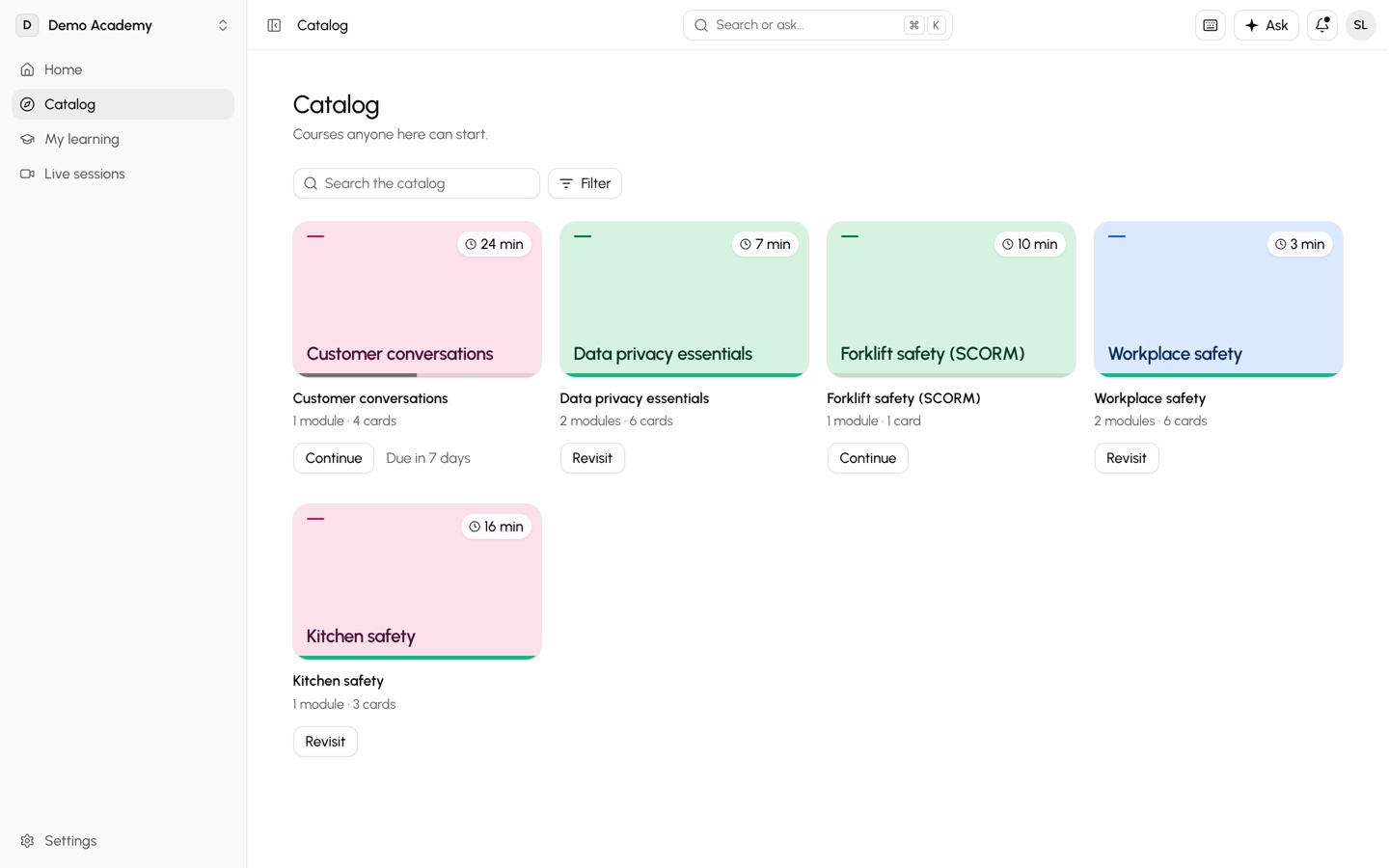
 العربية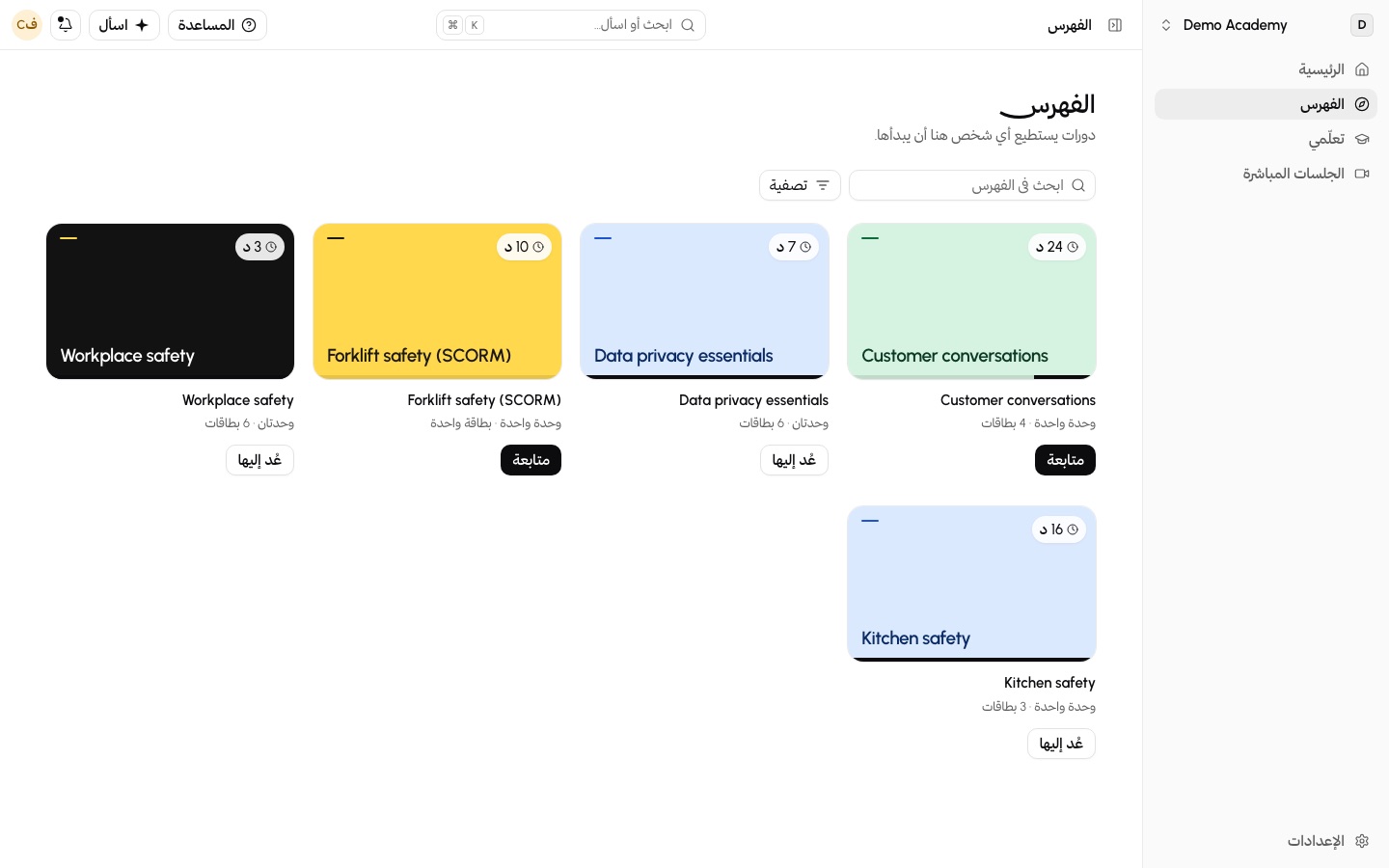
The AI drafts. Your trainers decide.
Do it, Ask first or Never, for each kind of action: for the copilot, outside AI clients over MCP and automations.
- Enforced on the server
- A person approves before it is published
- Every AI run is logged
Fits the systems you run.
Invite trainees by email to start. Add single sign-on and SCIM when ready.
- Sign-in
- Single sign-on. Require SSO for your domain.OIDCSAML
- Accounts
- SCIM 2.0 keeps users and groups in step.OktaEntra ID
- Roles
- Owner, Admin, Author, Instructor, Learner. Trainees never see settings.
- Standards
- Bring the packages you already sell.SCORM 1.2 / 2004LTI 1.3xAPI
- Meetings
- Click Connect and approve on the provider’s own screen. Nobody pastes an API key.ZoomMicrosoft TeamsGoogle Meet
- +Sophie LaurentAccount created
- ↻Thomas WrightNow a Trainer
- –Mark EvansDeactivated · record kept
- ⇄Trainers synced · 2 courses
Questions
Can one client see another’s trainees?
No. Each client is its own organization and sees only its own people. Only your owners and admins see numbers across clients.
Can a client change a course we share?
No. The client gets a read-only copy of your published version. When you publish a new version, every client’s copy follows, and trainees who finished stay finished.
Can we step in for a client?
Yes. Your admins and instructors can step in for up to eight hours. A bar shows it, and every step goes to the client’s activity log.
Can we use our training kits?
Yes. Upload a document or slides and the AI drafts modules, cards and practice questions. A trainer keeps or discards each one. SCORM packages import too.
Is it in Arabic and English?
Yes. The AI translates courses with your glossary, and each trainee picks a learning language. Every screen is in Arabic (right to left), English and Turkish.
How do we prove results?
With a completion-by-client report, test scores, attendance and learning gaps. Role-plays are graded on your criteria, and certificates carry a code anyone can check.
Do Zoom workshops count?
Yes. Classbase creates the Zoom, Teams or Google Meet meeting and reads attendance afterwards. Trainees can also check in with the trainer’s code.
How do we start?
Book a demo. In a 30-minute call we draft one of your courses live, then show sharing, tests, certificates and reports.
Related
Bring one course to the call.
A 30-minute call where we draft one of your courses live, in Arabic and English.
Book a demoBring one course to the call.
A 30-minute call where we draft one of your courses live, in Arabic and English.